To enhance security and data protection, CCAC has implemented new restrictions on browser extensions across Google Chrome, Microsoft Edge, and Mozilla Firefox. Users will no longer be able to install or use unapproved browser extensions. Only extensions that have been reviewed and explicitly approved by ITS will be allowed.
Chrome
- On your computer, open Chrome.
- At the top right, click More
- Click Extensions
- A list of extensions will be visible

For More Information
Direct Link
Copy and Paste the text below, into the Chrome Address Bar
chrome://extensions/
Firefox
- Click the menu button

- Choose Add-ons and themes. The Add-ons Manager tab will open.
- Select Extensions
For More Information
https://support.mozilla.org/en-US/kb/find-and-install-add-ons-add-features-to-firefox
Direct Link
Copy and Paste the text below, into the Firefox Address Bar
about:addons
Microsoft Edge
- In Microsoft Edge, select Extensions, located to the right of your browser address bar.
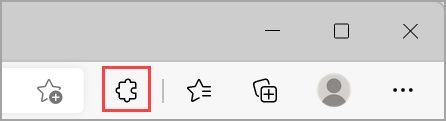
- If you don't see Extensions to the right of your browser address bar, select Settings,
- click more
- click Extensions
For More Information
Direct Link
Copy and Paste the text below, into the Edge Address Bar
edge://extensions/
Approved Extensions
- 1Password
- AInspector
- Axe DevTools
- Bitwarden Password Manager
- Calendly
- Claude AI
- ColorZilla
- Dark Reader
- Grammarly
- Honorlock
- IBM Accessibility Checker
- Kurzweil 3000
- LastPass
- Loom
- Perplexity AI
- Scribe
- Securden
- SentinelOne
- UBlock Origin Lite
- WAVE Evaluation Tool
Getting a browser extension approved
You can fill out a Supportal form, and that will create a ticket on your behalf. Then, the ITS teams will review your request and let you know whether the extension can be approved.
Browser Extension Request Form